1. What Moldex3D Brings to Conformal Cooling Analysis
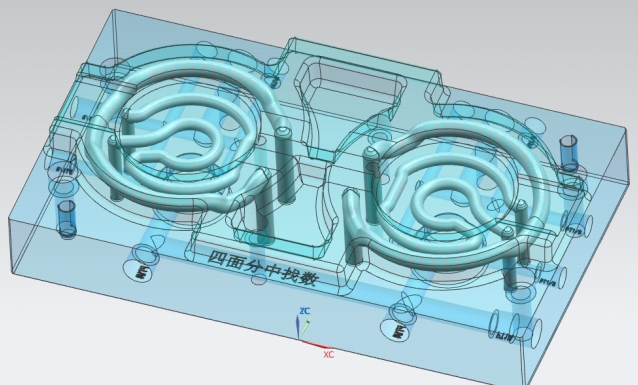
Moldex3D is a true 3D CAE simulation platform for injection molding that uses a proprietary BLM (Boundary Layer Mesh) solver. Unlike solvers that approximate cooling channels as 1D beam elements, Moldex3D meshes the entire mold block, cooling channels, and part cavity as interconnected 3D solid elements. This distinction becomes critical when you move from straight-drilled cooling lines to conformal cooling channels, where the channel cross-section may be oval, teardrop-shaped, or D-shaped, and the channel path follows the contour of the part surface at variable wall-to-channel distances.
For conformal cooling simulation, the 3D solid approach captures three phenomena that beam-element solvers miss:
- Non-uniform heat transfer coefficients around non-circular channel cross-sections, where the inner and outer radii of a curved channel see different flow velocities and therefore different convective heat transfer rates.
- Conduction bridging between closely spaced conformal channels, where the thermal interaction between adjacent channels affects the overall mold temperature field.
- Insert-to-base thermal contact resistance at the interface between a 3D-printed conformal insert (typically maraging steel or MS1) and the conventionally machined mold base (typically P20 or H13).
These capabilities make Moldex3D a strong choice for engineers who need to validate conformal cooling channel designs before committing to expensive metal 3D printing. The software is developed by CoreTech System in Taiwan and is widely used across Asia, Europe, and North America.
2. Setting Up a Conformal Cooling Simulation in Moldex3D
The setup process in Moldex3D differs from conventional cooling analysis primarily in meshing. Conformal channels demand more mesh refinement because of their complex geometry. Here is the step-by-step workflow:
Import the part CAD (STEP or IGES) and the mold block with conformal cooling channels already modeled as solid bodies. The channel geometry must be a subtracted (negative) volume within the mold solid. If your channels are modeled as centerline curves, you need to sweep them to solid bodies first. Moldex3D Studio accepts Parasolid, STEP, IGES, and native NX/CATIA formats.
Set the global element size based on the minimum wall thickness of the part. A good starting point is part wall thickness divided by 4. For the mold region around conformal channels, use local mesh refinement with element size equal to channel hydraulic diameter divided by 6. This ensures at least 6 elements across the channel cross-section.
Critical setting: Set the number of boundary layers to a minimum of 3 (5 is recommended for highest accuracy). Boundary layers are thin prismatic elements along the channel wall that capture the thermal boundary layer in the coolant flow. Insufficient boundary layers cause heat transfer coefficient errors of 15–30%.
Assign the polymer material from Moldex3D's database (or import custom pvT data). For the mold, assign the correct steel grade. If the conformal insert is a different material than the mold base, you must define both materials and assign them to the correct solid regions. Typical combinations:
- Conformal insert: Maraging steel (1.2709 / MS1) — thermal conductivity ~20 W/m-K
- Mold base: P20 — thermal conductivity ~29 W/m-K
- Mold base: H13 — thermal conductivity ~24.5 W/m-K
The thermal conductivity difference between a printed MS1 insert (~20 W/m-K) and P20 base (~29 W/m-K) is significant. Ignoring it will overpredict cooling performance by 8–15%.
Define inlet temperature, flow rate, and coolant type (water, oil, or water-glycol mixture). Use measured flow rates from the actual mold setup if available. Default flow rates in simulation software are typically too high. For conformal channels with hydraulic diameter of 4–8 mm, target Reynolds number above 10,000 for turbulent flow. For a 6 mm diameter channel with water at 25 C, this means a flow rate of at least 4.5 L/min.
Run the analysis in this order: Fill → Pack → Cool → Warp. The cooling analysis should be set to "Transient" mode rather than "Steady-state" for conformal cooling. Steady-state analysis assumes the mold has reached thermal equilibrium, which overpredicts the cooling efficiency of conformal channels by 10–20% compared to the cyclic transient reality. Set the number of molding cycles to at least 15 to reach cyclic steady state.
3. Key Simulation Outputs and What They Mean
After the simulation completes, Moldex3D produces several output fields that are critical for evaluating conformal cooling design effectiveness:
Cooling Time
The time required for the hottest point in the part to reach ejection temperature. For conformal cooling, expect 20–40% reduction compared to conventional straight-drilled channels. If Moldex3D shows less than 10% improvement, the channel layout likely has coverage gaps or the channels are too far from the cavity surface.
Mold Surface Temperature Distribution
This is the most important output for conformal cooling evaluation. Look at the temperature range (delta T) across the cavity surface at end of cooling. A well-designed conformal circuit should achieve a delta T of less than 5 degrees C across the entire cavity surface. Conventional cooling typically shows 15–30 degrees C variation. Temperature uniformity directly correlates with warpage reduction and surface quality improvement.
Warpage Prediction
Moldex3D predicts total warpage as a displacement field on the part. For conformal cooling validation, compare the warpage magnitude and pattern between the conventional cooling baseline and the conformal design. Typical warpage reduction is 30–60%. The warpage analysis uses the temperature field from the cooling analysis as input, so errors in the cooling prediction propagate directly into the warpage result.
Coolant Pressure Drop
The pressure drop through the conformal circuit determines whether the channels can be adequately fed by the mold temperature controller (MTC). Moldex3D calculates pressure drop based on the actual 3D channel geometry. For conformal channels, pressure drop is typically 1.5–3x higher than conventional straight channels due to the curved paths. If the predicted pressure drop exceeds 3 bar, consider increasing the channel diameter or splitting the circuit into parallel branches.
Volumetric Shrinkage
Uniform cooling from conformal channels reduces the variation in volumetric shrinkage across the part, which is the root cause of warpage. Look at the shrinkage contour plot for hot spots — areas of high shrinkage indicate insufficient cooling coverage.
4. Moldex3D vs. Moldflow for Conformal Cooling Analysis
Both Moldex3D and Autodesk Moldflow can simulate conformal cooling, but they use fundamentally different approaches to channel modeling. Here is a detailed comparison:
| Feature | Moldex3D (BLM Solver) | Moldflow (Beam Element) |
|---|---|---|
| Channel mesh type | 3D solid with boundary layers | 1D beam elements |
| Non-circular cross-sections | Fully resolved geometry | Approximated as equivalent circular |
| Channel-to-channel thermal interaction | Captured via 3D conduction | Not directly modeled |
| Insert/base contact resistance | Definable interface condition | Requires manual workaround |
| Transient cyclic analysis | Built-in, up to N cycles | Built-in, up to N cycles |
| Warpage prediction accuracy | High (3D thermal input) | Moderate (interpolated thermal input) |
| Solver speed (single cavity) | 30–60 min (high element count) | 10–25 min (lower element count) |
| Learning curve | Steeper (manual mesh control) | Gentler (more automated) |
| DOE / optimization | Built-in DOE module | Built-in DOE module |
| Licensing cost (annual) | $15,000–$45,000 | $18,000–$50,000 |
For conventional straight-drilled cooling, both platforms give comparable results. The accuracy gap widens when channels deviate from circular cross-sections and follow complex 3D paths — this is where Moldex3D's solid mesh approach provides measurably better temperature and warpage predictions.
5. Moldex3D Designer BLM vs. eDesign Workflow
Moldex3D offers two primary workflows for conformal cooling simulation. Choosing the right one depends on your project stage and accuracy requirements.
| Aspect | Designer BLM (Desktop) | eDesign (Cloud) |
|---|---|---|
| Mesh control | Full manual control over element size, boundary layers, local refinement | Automated meshing with limited user control |
| Channel geometry handling | Imports full 3D solid channel geometry | Supports channels but simplifies complex geometry |
| Solver options | Transient, steady-state, coupled, DOE | Standard analysis types |
| Post-processing | Full 3D visualization, cross-section probes, export to CSV | Web-based viewer with basic probes |
| Best use case | Final validation of conformal design | Feasibility screening, concept comparison |
| Hardware requirement | Workstation with 32+ GB RAM | Web browser only |
| Typical solve time | 30–90 min (local compute) | 15–45 min (cloud compute) |
Run 3–5 channel layout concepts through eDesign to identify the most promising design direction. Then set up the final design in Designer BLM with manually refined mesh and transient cyclic analysis. This two-stage approach reduces total engineering time by 40–60% compared to running every iteration through the full BLM workflow.
6. Interpreting Results: Temperature Bands and Pressure Drop Thresholds
What Delta-T Bands Mean
The temperature variation (delta T) across the mold cavity surface at the end of cooling is the single most important metric for evaluating conformal cooling performance. Here is how to interpret the numbers:
| Delta T Range | Rating | Interpretation |
|---|---|---|
| < 3 °C | Excellent | Minimal warpage risk. Suitable for tight-tolerance parts, optical components, and class-A surfaces. |
| 3–5 °C | Good | Acceptable for most injection molding applications. Standard target for conformal cooling designs. |
| 5–10 °C | Marginal | Some warpage risk on thin-wall parts. May be acceptable for structural parts without cosmetic requirements. |
| 10–15 °C | Poor | Likely warpage issues. Conformal design needs revision — check for coverage gaps or channels too far from cavity. |
| > 15 °C | Unacceptable | No significant improvement over conventional cooling. Redesign the channel layout. |
Pressure Drop Thresholds
Coolant pressure drop through the conformal circuit must be compatible with the mold temperature controller's pump capacity. Exceeding the MTC's pressure capability results in reduced flow rate, turbulence loss, and degraded cooling performance.
A common design mistake is to make conformal channels too small (under 4 mm diameter) in pursuit of maximum cooling surface area. While smaller channels allow placement closer to the cavity, the pressure drop increases with the fourth power of the diameter reduction. A 4 mm channel has 5x the pressure drop of a 6 mm channel at the same flow rate.
7. Common Simulation Mistakes in Moldex3D
After reviewing hundreds of Moldex3D conformal cooling simulations from customer projects, these are the errors we see most frequently. Avoiding them will save significant iteration time and improve correlation with actual mold performance.
Using fewer than 3 boundary layers around the cooling channel walls. This causes the solver to underestimate the convective heat transfer coefficient by 15–30%, making the simulation overly optimistic about cooling performance. Fix: always use at least 3 layers; use 5 for final validation runs.
Accepting the software's default flow rate instead of entering the actual measured value from the mold. Default values are often 10–15 L/min, while actual conformal circuits may only achieve 3–6 L/min due to higher pressure drop. This makes the simulation predict much better cooling than reality delivers. Fix: measure the actual flow rate with a flow meter at the mold, or calculate the expected flow using the MTC pump curve and the predicted circuit pressure drop.
Assigning one steel grade (e.g., P20) to the entire mold when the conformal insert is actually printed in maraging steel (MS1) with 30% lower thermal conductivity. This overpredicts heat extraction from the insert region. Fix: define separate material zones for the conformal insert and mold base, and include a thermal contact resistance at the interface (0.5–2.0 x 10^-4 m2-K/W depending on fit quality).
Running only a steady-state cooling analysis. Steady-state assumes the mold has reached thermal equilibrium, which overpredicts conformal cooling effectiveness by 10–20%. In reality, the mold temperature oscillates with each cycle. Fix: use transient cyclic analysis with at least 15 cycles to reach cyclic steady state.
3D-printed conformal channels have internal surface roughness of Ra 6–15 micrometers, compared to Ra 1–3 for drilled channels. Higher roughness increases both the heat transfer coefficient (beneficial) and the friction factor (increases pressure drop). The net effect depends on the Reynolds number regime. Fix: set the channel surface roughness parameter in the coolant condition setup. Moldex3D allows custom roughness values.
8. When Simulation Matches Reality vs. When It Does Not
Based on correlation studies across multiple production mold programs, here is a practical guide to when you can trust Moldex3D conformal cooling predictions and when to add safety margins:
High correlation (within 5–10% of measured values)
- Single-material molds where the entire tool is the same steel grade
- Channels with hydraulic diameter above 5 mm and Reynolds number above 10,000
- Parts with relatively uniform wall thickness (variation less than 2:1)
- Water-based coolant at temperatures below 40 degrees C
- Simulations run with transient cyclic analysis and at least 15 cycles
Moderate correlation (10–20% deviation)
- Mixed-material molds (MS1 insert in P20 base) with estimated contact resistance
- Channels with hydraulic diameter of 3–5 mm where the flow regime is transitional
- Parts with deep ribs where the mesh may not fully resolve the rib root cooling
- Oil-based coolant at elevated temperatures (80–140 degrees C) where fluid property variation is significant
Lower correlation (20–35% deviation possible)
- Channels with partially blocked cross-sections due to residual powder from the 3D printing process
- Very small channels (< 3 mm) where surface roughness dominates the flow behavior
- Multi-cavity molds where manifold pressure distribution is not accurately modeled
- Molds with significant air gaps around insert pockets (poor mechanical fit)
The most common source of simulation-to-reality mismatch is not the solver accuracy — it is the input data. Wrong flow rates, incorrect material assignments, and unmeasured contact resistance account for over 80% of prediction errors.
9. Tips for Faster Simulation Runs
Moldex3D conformal cooling simulations can be computationally expensive due to the high element count required for 3D solid meshing. Here are practical ways to reduce solve time without sacrificing accuracy:
- Use symmetry. If the part and mold have a plane of symmetry, model only half the geometry. This reduces element count by 50% and solve time by approximately 60% (the solver overhead is not purely linear).
- Coarsen the far-field mesh. The mold region more than 30 mm from the cavity surface and cooling channels does not need fine mesh. Use a mesh size ratio of 3:1 between the far field and the near-channel region.
- Reduce the number of cycles. For concept screening, 8–10 transient cycles are sufficient to see the relative ranking between design options. Reserve 15+ cycles for final validation only.
- Run cooling-only analysis first. Skip the fill and pack phases during channel layout optimization. Use a uniform initial melt temperature. This cuts total solve time by 60% and gives a valid relative comparison between channel designs.
- Use parallel computing. Moldex3D supports multi-core parallel solving. On a 16-core workstation, expect a 4–6x speedup compared to single-core execution. The scaling is not linear beyond 8 cores due to memory bandwidth limitations.
- Downsample output frequency. Writing result files at every sub-step increases disk I/O time. Set the output interval to every 2nd or 5th cycle for transient analysis.
Initial setup: Full mold, 4 cavities, 2.8M elements, 20 transient cycles — solve time 4.5 hours.
Optimized setup: Quarter-symmetry model, coarsened far-field mesh, 12 transient cycles, 8-core parallel — solve time 38 minutes.
Temperature prediction difference: Less than 0.3 degrees C between the full and optimized models.
10. Licensing Tiers and Feature Availability
Moldex3D licensing is modular. Not all tiers include the features needed for conformal cooling analysis. Here is what each tier provides:
| Feature | Standard | Professional | Advanced | eDesign |
|---|---|---|---|---|
| Basic cooling analysis (beam elements) | Yes | Yes | Yes | Yes |
| 3D solid cooling (BLM) | No | Yes | Yes | Limited |
| Conformal channel geometry | No | Yes | Yes | Simplified |
| Transient cyclic cooling | No | Yes | Yes | No |
| Multi-material mold zones | No | Yes | Yes | No |
| Warpage analysis | Linear | Linear + Viscoelastic | Linear + Viscoelastic | Linear |
| DOE / Optimization | No | No | Yes | No |
| Parallel computing | 4 cores | 16 cores | Unlimited | Cloud |
| Approximate annual cost | $15,000 | $28,000 | $45,000 | $8,000–$15,000 |
The Standard tier's beam-element cooling analysis cannot model conformal channel geometry. If you are investing in conformal cooling technology, you need at least the Professional tier with the Cooling module to get meaningful simulation results. The Advanced tier's DOE capability is worth the premium if you are optimizing channel layouts across multiple design variables.
11. Frequently Asked Questions
Yes. Moldex3D's BLM solver handles conformal cooling channels with non-circular cross-sections and complex 3D paths. When properly set up with at least 3 boundary layers and correct inputs, it predicts cooling time within 5–12% of measured values.
Designer BLM is the desktop solver with full mesh control — recommended for conformal cooling validation. eDesign is the cloud platform with automated meshing, best for quick feasibility studies and concept comparison.
Moldex3D uses true 3D solid meshing that captures non-circular cross-sections and channel-to-channel thermal interaction. Moldflow uses beam elements that assume circular cross-sections. For conformal channels, Moldex3D generally provides more accurate temperature and warpage predictions.
At minimum, the Professional tier with the Cooling module. The Standard tier only supports beam-element cooling analysis, which cannot model conformal channel geometry. The Advanced tier adds DOE capability for layout optimization.
The top five are: insufficient boundary layer mesh, using default flow rates, assigning a single mold material when the insert and base differ, running steady-state instead of transient analysis, and ignoring the internal surface roughness of 3D-printed channels.
MouldNova provides Moldex3D-validated conformal cooling inserts — from channel design through 3D printing and CNC finishing. We run full transient cooling simulations on every insert before production and provide before/after thermal comparison reports.
Request a Simulation Report →Related Pages
- Conformal Cooling Simulation — Methods, Software & Best Practices
- Conformal Cooling Design Software — Tools for Channel Layout & Optimization
- Conformal Cooling Channel Design — Diameter, Pitch & Layout Rules
- Conformal Cooling Design — Engineering Guidelines
- Conformal Cooling & 3D Printing — Process, Materials & Quality
- Conformal Cooling Inserts — Service Details & Specifications