- What Fusion 360 can and cannot do for conformal cooling channel design
- Netfabb's conformal cooling toolset: automated channel generation, lattice structures, print prep
- Autodesk generative design and its (limited) relevance to cooling channels
- How Autodesk compares to Moldex3D, Magics, and nTop for this application
- Recommended software workflow combining Autodesk tools with dedicated simulation
- When in-house Autodesk tools make sense vs. working with a specialist supplier
Table of Contents
- The Conformal Cooling Software Landscape
- Fusion 360: Capabilities for Conformal Cooling
- Autodesk Netfabb: The More Capable Tool
- Generative Design: What It Can and Cannot Do
- Software Comparison: Autodesk vs. Moldex3D vs. Magics vs. nTop
- Recommended Workflow: Combining Tools Effectively
- Autodesk Limitations for Production Tooling
- When to Use Software vs. Work With a Specialist Supplier
- FAQ
The Conformal Cooling Software Landscape
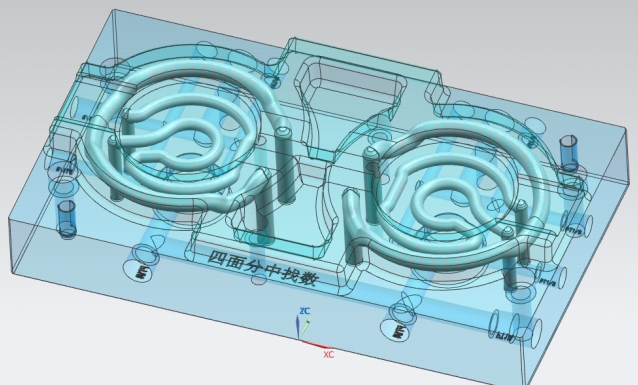
Conformal cooling channel design sits at the intersection of three domains: injection mold design, additive manufacturing (SLM/DMLS), and thermal simulation. No single software package dominates all three. Understanding which tool excels at which task is the foundation for building an effective design workflow.
The main software categories in play:
- CAD / Channel geometry creation: Fusion 360, NX Mold Wizard, CATIA Mold Design, SolidWorks with MoldWorks
- AM-specific channel design and print preparation: Autodesk Netfabb, nTop (formerly nTopology), Materialise Magics
- Injection molding simulation: Autodesk Moldflow, Moldex3D, Cadmould
- Thermal optimization / topology: Autodesk generative design, ANSYS Additive, Siemens NX AM
Autodesk occupies several of these categories simultaneously — Fusion 360 (CAD), Netfabb (AM prep), and Moldflow (simulation) are all Autodesk products, which creates potential for a single-vendor workflow. This integration is one of Autodesk's main advantages, though each individual tool has specific limitations that are important to understand before committing to it.
Fusion 360: Capabilities for Conformal Cooling
Fusion 360 is a general-purpose parametric CAD and CAM platform. For conformal cooling specifically, its capabilities fall into two areas:
What Fusion 360 does well
Fusion 360 CAN do this
- Create 3D sketch paths for conformal channel centerlines on any surface
- Sweep circular, teardrop, or custom cross-sections along those paths
- Boolean subtract channel bodies from an insert solid
- Perform basic thermal simulation in the Simulation workspace (temperature distribution, heat flux)
- Run a simple flow simulation to estimate pressure drop and flow rate through a channel network
- Generate STEP or STL files for SLM printing preparation
- Check wall thickness between channels and cavity surface using the Inspection tool
Fusion 360 CANNOT do this
- Automatically generate an optimised conformal channel layout from a cavity surface — the designer must manually sketch every channel path
- Simulate injection molding process (fill, pack, cool, warp) — this requires Moldflow or Moldex3D
- Predict cycle time reduction from a given conformal design with injection molding resin data
- Generate support structures for SLM printing of internal channel geometries
- Evaluate residual stress or distortion from SLM printing (build simulation)
- Handle multi-circuit flow balancing with back-pressure calculations across parallel branches
Fusion 360's simulation module uses a finite element thermal solver that can evaluate steady-state heat transfer — useful for identifying hotspots in a proposed channel layout. However, it does not model the cyclic thermal loading of injection molding (the alternating injection heat input and cooling phase) that Moldflow and Moldex3D simulate. The Fusion 360 thermal results are directionally useful but should not be used as a substitute for dedicated injection molding simulation before committing to manufacturing.
Fusion 360 Manufacturing Extension and Mold Design
The Manufacturing Extension (subscription add-on) includes mold design tools with parting line detection, draft analysis, and core/cavity splitting. These are genuinely useful for the mold base design around a conformal insert, but they do not add conformal channel-specific capabilities beyond what the base Fusion 360 solid modeling environment already provides.
Autodesk Netfabb: The More Capable Tool for Conformal Cooling
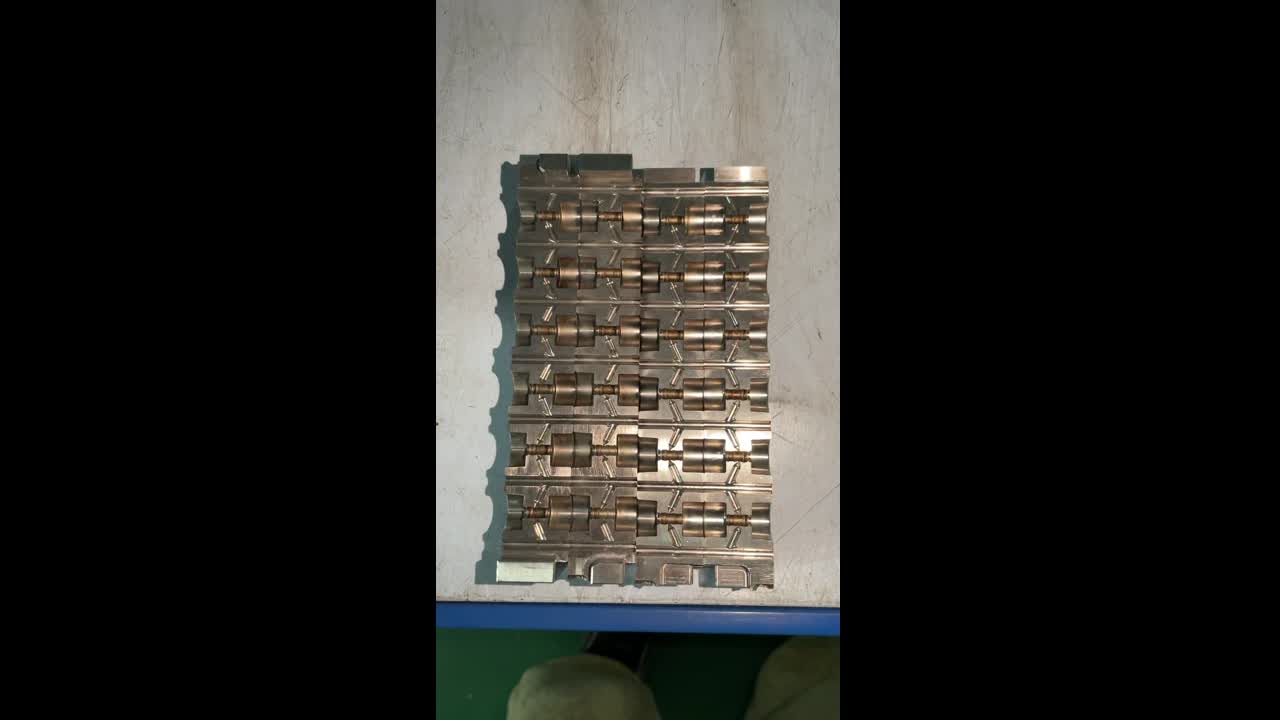
Netfabb is Autodesk's dedicated additive manufacturing platform and has the most developed conformal cooling toolset in the Autodesk product family. It is a separate product from Fusion 360, licensed independently (typically $6,000–18,000/year depending on tier), and is aimed at AM engineers and production teams rather than general mechanical designers.
Netfabb's conformal cooling-specific capabilities
Automated conformal channel generation
Netfabb can generate conformal channel centerlines automatically from a reference surface at a user-specified offset distance (e.g., 10mm from the cavity face). The tool respects the surface geometry and outputs a 3D network of channel paths that maintain constant offset from the surface. The designer specifies pitch (channel-to-channel spacing), diameter, and start/end points for the circuit. This eliminates most of the manual 3D sketching work required in Fusion 360.
Multiple channel cross-section options
Netfabb supports round, teardrop, and diamond channel cross-sections natively. Teardrop channels (round bottom, pointed top) are the preferred profile for SLM printing because the pointed crown is self-supporting without requiring support structures inside the channel — a critical advantage that avoids the powder removal nightmare of collapsed internal supports. See our article on cleaning powder from conformal cooling channels.
Build orientation and support generation
Netfabb evaluates build orientation options for the conformal insert and generates support structures for overhanging external features. Internal channels (if designed as teardrop cross-sections at correct print angle) typically require no internal supports. The orientation optimizer minimizes total support volume while keeping internal channels in a self-supporting orientation.
Build process simulation (Netfabb Local Simulation add-on)
The Local Simulation add-on (separate license) predicts thermal gradients, residual stress, and part distortion during SLM printing. For large conformal inserts where print distortion could affect fit tolerances, this pre-print simulation can identify high-stress zones and guide support placement or part orientation adjustments before the actual print.
Generative Design: What It Can and Cannot Do for Conformal Cooling
Autodesk's generative design feature (available in Fusion 360 and as a cloud-based tool) is frequently cited in marketing material as a tool for conformal cooling. The reality is more nuanced — generative design can be useful but is not a primary conformal cooling design tool.
Generative design optimises the distribution of material in a component given structural load cases and manufacturing constraints. When applied to a conformal cooling insert, it can:
- Reduce material volume while maintaining structural integrity under injection pressure
- Create organic internal geometries that incorporate void spaces (which could be specified as cooling channels)
- Evaluate multiple design outcomes across different manufacturing methods (machining, casting, SLM) simultaneously
However, generative design does not:
- Understand injection molding thermal requirements — it has no concept of "cool this surface uniformly at 8mm offset"
- Design cooling channels to specific hydraulic parameters (diameter, Reynolds number, pressure drop)
- Replace a conformal channel designer who understands the thermal physics of injection molding
Software Comparison: Autodesk vs. Moldex3D vs. Magics vs. nTop
| Capability | Fusion 360 | Netfabb | Moldex3D | Materialise Magics | nTop |
|---|---|---|---|---|---|
| Manual channel path creation | ✓ Good | ✓ Good | ✗ | ✗ | ✓ Good |
| Automated conformal channel generation | ✗ | ✓ Yes | ✗ | ✗ | ✓ Best-in-class |
| Injection molding simulation (fill/pack/cool) | ✗ | ✗ | ✓ Best-in-class | ✗ | ✗ |
| Cooling uniformity / ΔT prediction | Basic FEA only | ✗ | ✓ Full | ✗ | ✗ |
| Cycle time prediction | ✗ | ✗ | ✓ Full | ✗ | ✗ |
| SLM print preparation & supports | ✗ | ✓ Full | ✗ | ✓ Full | Partial |
| Build process simulation | ✗ | ✓ Add-on | ✗ | ✓ Add-on | ✗ |
| Lattice / triply periodic channel structures | ✗ | Limited | ✗ | ✗ | ✓ Full |
| Approximate annual license cost | $545–$1,680 | $6,000–18,000 | $8,000–25,000 | $5,000–12,000 | $15,000–30,000 |
nTop (formerly nTopology) deserves special mention. It is the most capable tool specifically for conformal cooling channel geometry generation — it can create channels that follow any surface at constant offset, with full parametric control over diameter, pitch, circuit layout, and cross-section. For companies investing seriously in in-house conformal cooling design capability, nTop is the state-of-the-art design tool, though at a significant license cost. See also our article on conformal cooling design software for a broader platform comparison.
Recommended Workflow: Combining Autodesk Tools with Dedicated Simulation
The most effective in-house workflow using Autodesk tools integrates their respective strengths across the design-to-manufacture process:
Part and insert geometry in Fusion 360
Create the part model and design the insert envelope (the block from which the cavity and conformal channels will be subtracted). Define ejector pin positions, parting line, and water port exit locations in Fusion 360. Export insert envelope as STEP.
Baseline simulation in Moldflow (Autodesk)
Run a baseline cooling-only Moldflow analysis to identify hotspots and quantify where conformal cooling is needed. Moldflow is an Autodesk product (Autodesk Moldflow Insight or Synergy), so data exchange with Fusion 360 is relatively streamlined via Fusion 360 Manage or direct STEP import. This step defines the target zones for conformal channels.
Conformal channel design in Netfabb
Import the insert STEP into Netfabb. Use the conformal channel generation tool to create channel networks at the target offset (8–12mm from cavity surface) in the hotspot zones identified in Step 2. Select teardrop cross-section at the appropriate print angle to avoid internal supports. Export as body solid or STEP.
Validation in Moldflow or Moldex3D
Return to simulation with the conformal channel geometry to validate: temperature distribution (target ΔT <5°C), cooling time map, pressure drop per circuit (target <0.5 bar), and warpage prediction. This step is non-negotiable before manufacturing. If Moldflow Insight is not available, this validation step is where working with a specialist supplier (who provides free simulation as part of the quote) becomes attractive.
Print preparation in Netfabb
Finalise build orientation, generate supports for external overhangs, nest with other builds if multiple inserts are printing simultaneously, and export the build file for your SLM machine. Netfabb supports most major SLM machine formats (EOS, SLM Solutions, Renishaw, 3D Systems).
Autodesk Tool Limitations for Production Tooling
Several limitations of Autodesk tools are important to understand before relying on them for production conformal cooling design:
- No injection-molding-specific thermal database in Fusion 360: The Fusion 360 thermal simulation uses generic material properties. Molding resin thermal behaviour (specific heat, thermal conductivity, crystallisation enthalpy) requires a dedicated resin database, which Moldflow and Moldex3D maintain and update from resin supplier data sheets. Generic properties lead to systematic simulation errors of 15–25% in predicted cooling time.
- Netfabb channel generation does not calculate Reynolds number: The automated conformal channel tool generates a geometrically conformal channel network but does not tell the designer whether the resulting flow at a specified pressure will be turbulent (Re > 4,000) or laminar. A laminar-flow conformal channel performs 5–10× worse than a turbulent one. The designer must manually calculate this.
- Moldflow Synergy (the lower-tier product) lacks the cool-only analysis module: For conformal cooling evaluation, Moldflow Insight (the higher tier) is required. Synergy users often discover they cannot run the specific analysis type needed for cooling validation.
- Build simulation in Netfabb requires additional license: The Local Simulation add-on is separately licensed and adds significant cost. Many users who buy Netfabb for conformal cooling design discover the build simulation is not included.
When to Use Autodesk Software vs. Work With a Specialist Supplier
The decision is primarily about in-house capability, IP ownership, and project volume:
| Consideration | Use Autodesk In-House | Work With Specialist Supplier |
|---|---|---|
| Team AM/simulation experience | Experienced team with dedicated AM engineer | No in-house AM expertise |
| IP ownership requirement | Must own channel design IP | Design IP can reside with supplier |
| Project frequency | >10 conformal projects per year justifies software investment | <5 projects/year; fixed cost amortisation unfavourable |
| Simulation requirement | Have Moldflow Insight license and expertise to run cooling analysis | Need Moldflow results but don't have the license or skill |
| Time to first part | Slower (learning curve, software setup, internal validation) | Faster (supplier runs established process, provides validated design) |
| Print execution | In-house SLM machine or outsourced print service | Supplier handles print, post-process, QC, and delivery |
For most injection mold shops and OEM tooling departments, working with a specialist supplier for the conformal cooling design and manufacturing — while using Fusion 360 for the surrounding mold base design — is the most practical and cost-effective arrangement. The supplier brings Moldflow simulation, SLM printing, post-processing, and QC as an integrated service, removing the need to invest in Netfabb, print-capable SLM machines, and specialist operators internally.
Get a Free Moldflow Simulation With Every Quote
MouldNova includes a validated Moldflow cooling analysis — temperature map, ΔT table, pressure drop, cycle time prediction — with every conformal cooling insert quote. No software investment required on your side.
Frequently Asked Questions
Can Fusion 360 design conformal cooling channels?
How does Autodesk's generative design compare to Moldex3D for conformal cooling?
What is Autodesk Netfabb used for in conformal cooling?
When should I use Autodesk tools vs. working directly with a conformal cooling specialist supplier?
Related Articles & Pages
- Conformal Cooling Design Software: Platform Comparison Guide
- Moldex3D Conformal Cooling: Simulation Setup & Results Interpretation
- Conformal Cooling Simulation: Setup, Results & When to Trust Them
- Conformal Cooling Channel Design: Parameters & Engineering Workflow
- Cleaning Powder From Conformal Cooling Channels After SLM Printing
- Conformal Cooling Mold Design: Engineering Guide for 2026
- Our Conformal Cooling Insert Service — Get a Quote